

Mobile Legends beginner guide: how to play and which heroes to unlock
In Mobile Legends, your team wins by destroying the enemy base. You need to clear a path through turrets and buy combat items with gold earned during the match.
After the tutorial, play an AI match as Layla on Gold Lane, the lane marked with a gold symbol on the map. As a marksman, you deal damage from range but struggle against enemies who get close. Set three goals for your first games: collect minions, keep your distance and attack turrets when an opening appears.
After the tutorial, play an AI match as Layla on Gold Lane, the lane marked with a gold symbol on the map. As a marksman, you deal damage from range but struggle against enemies who get close. Set three goals for your first games: collect minions, keep your distance and attack turrets when an opening appears.
Settings: graphics and targeting
From the main screen, tap the cog in the upper-right corner. The setting names below match the English screenshots.
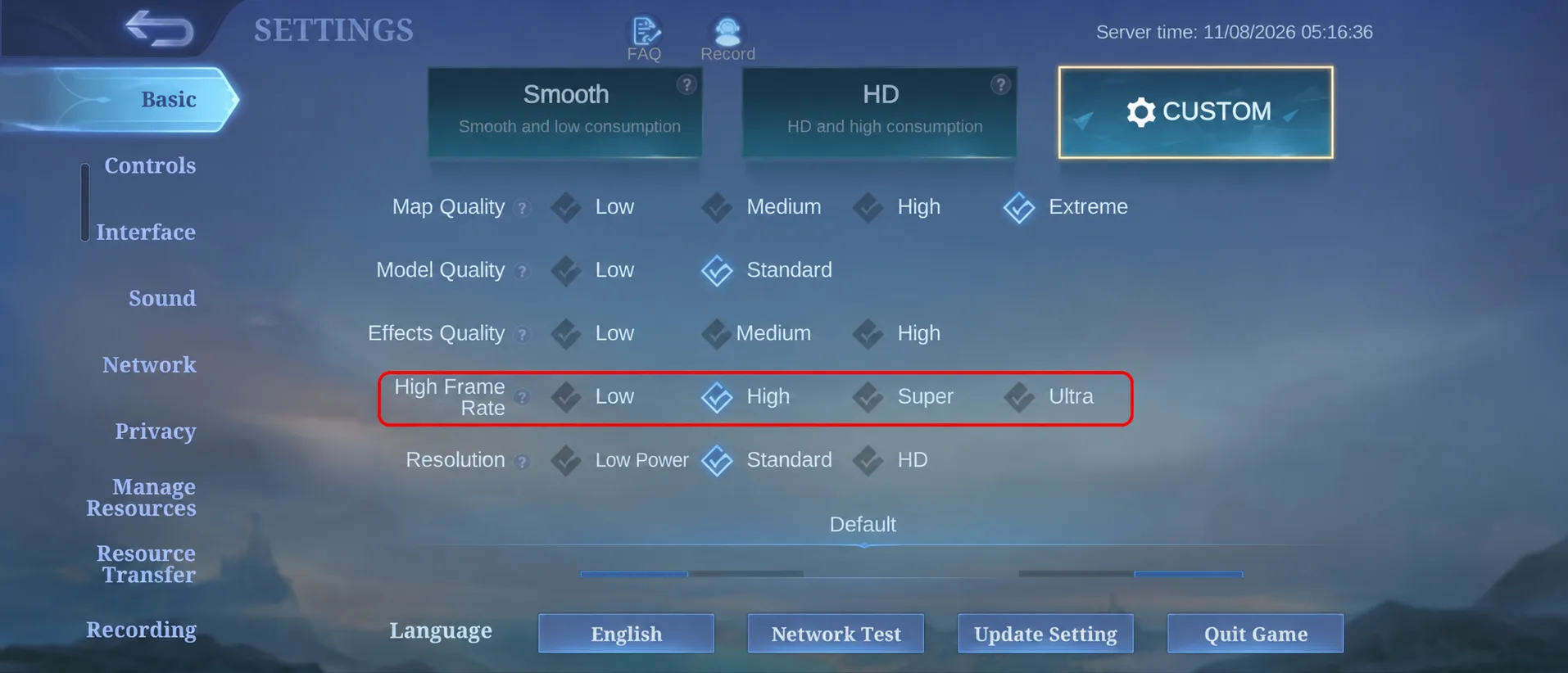
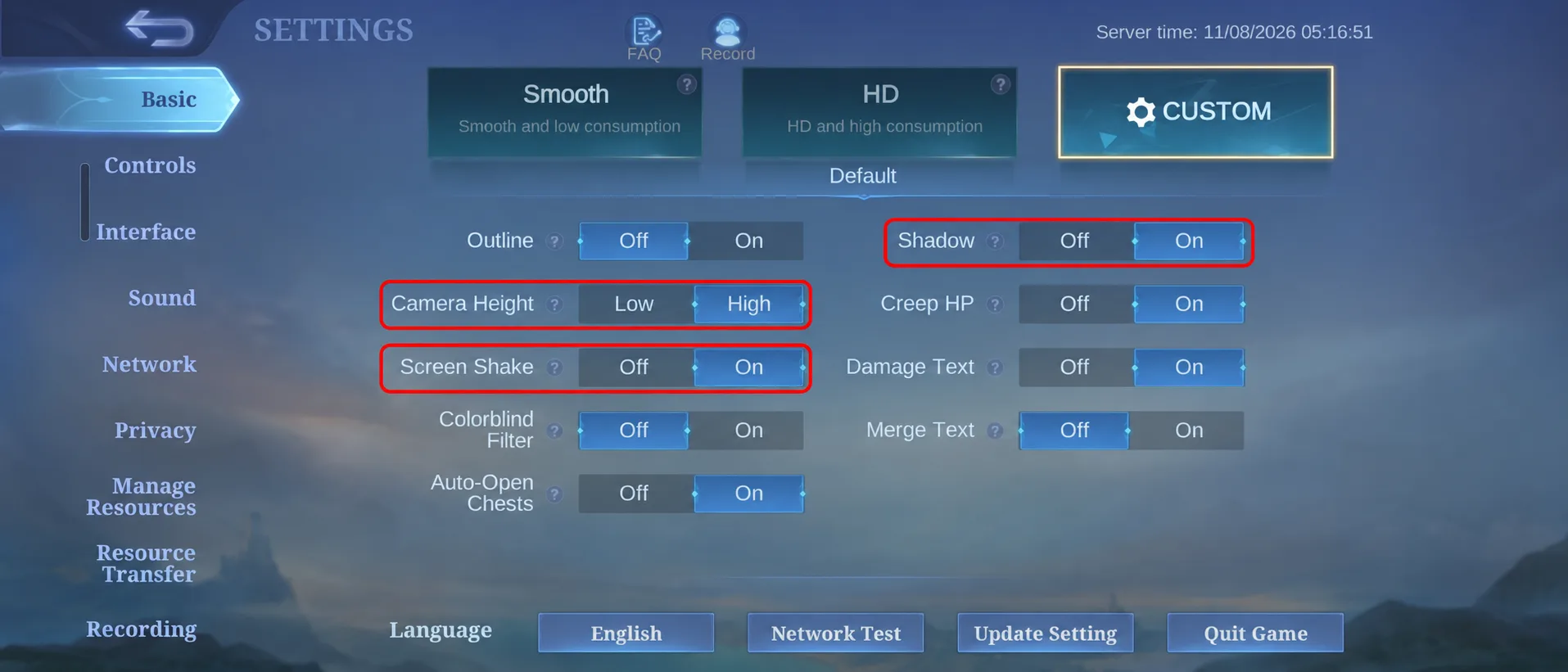
- Basic → Custom: set High Frame Rate → High and Resolution → Standard. Further down in the same section, set Camera Height → High, Screen Shake → Off and Shadow → Off. Lower the frame rate if your phone overheats or the image stutters; on a less powerful phone, you can start with the Smooth preset.
- Controls: select Advanced (Select Targeting). Separate minion and turret attack buttons let you hit the intended unit instead of switching to a nearby enemy hero.
- In Controls, scroll to the Target section and enable Hero Lock Mode → On. Nearby enemy portraits let you select a specific hero as your target. In Practice, learn to change targets and cancel your selection.
 1 / 2
High Frame Rate, Camera Height, Shadow and Screen Shake under Basic → Custom.
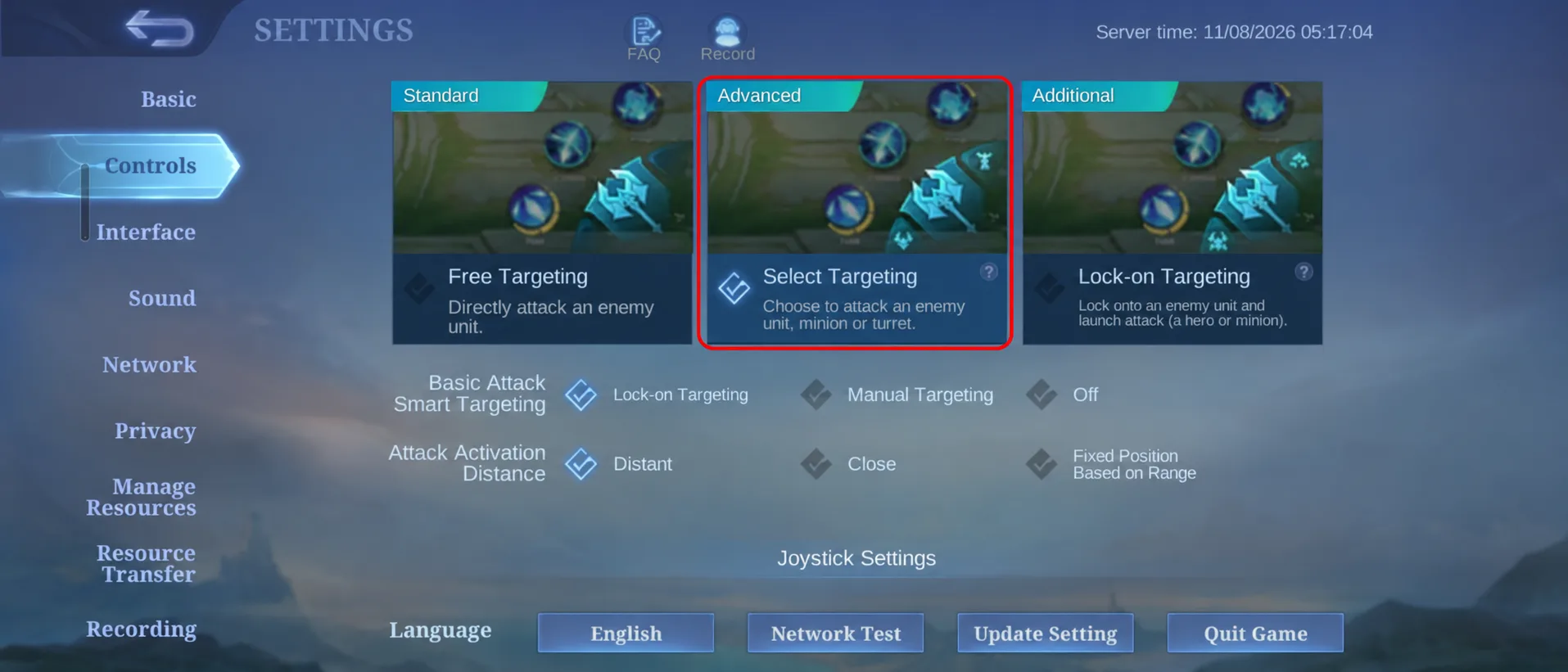
Advanced (Select Targeting) adds separate hero, minion and turret attack buttons.
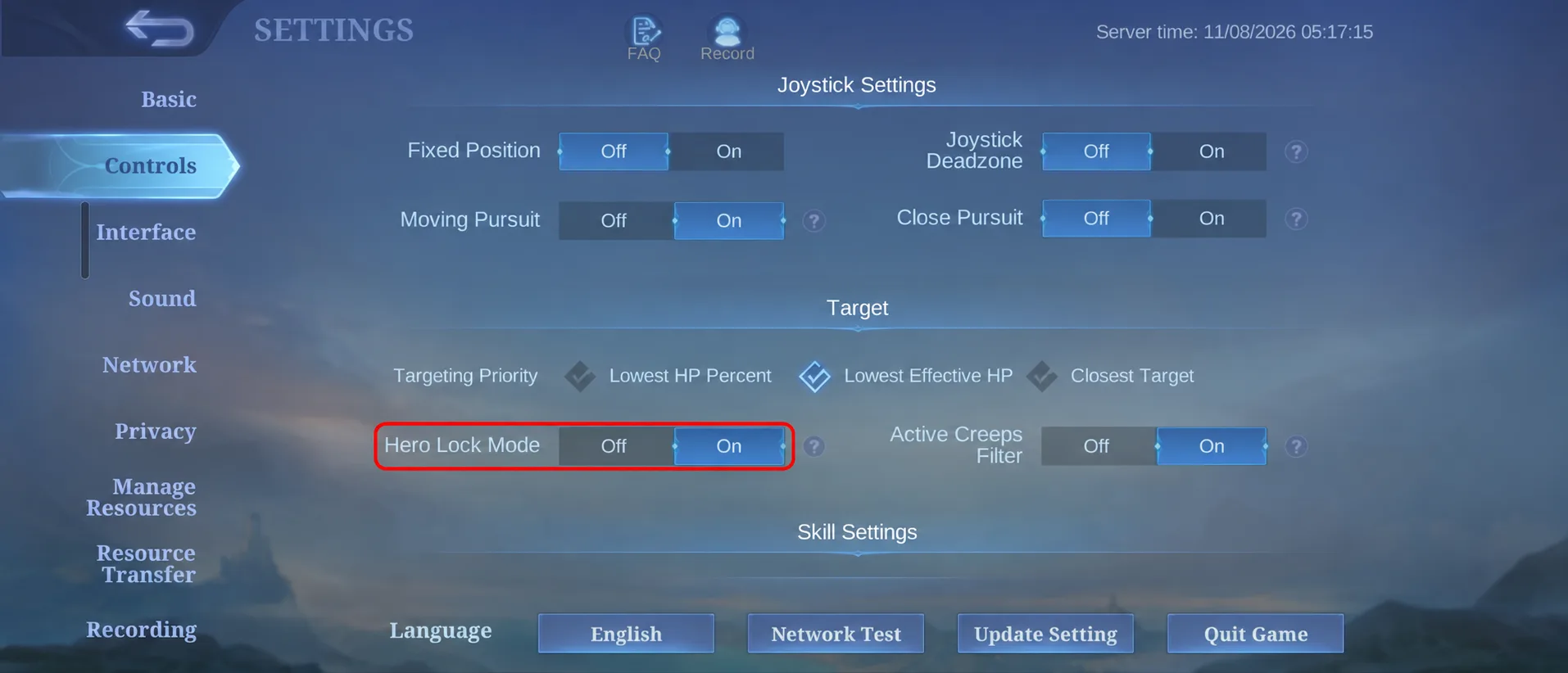
Target selection with Hero Lock Mode under Controls.
Your first match, using Layla as an example
| Position | Your job |
|---|---|
| Gold Lane | Earn gold from minions, buy items and attack from range. Layla is a beginner option for this position. |
| Mid Lane | Clear the middle wave and help teammates in the side lanes. Eudora is an example. |
| EXP Lane | Gain levels, defend your lane and join nearby fights. Balmond is an example. |
| Jungle | Clear jungle monsters, help the lanes and contest Turtle and Lord. This position requires the Retribution battle spell. |
| Roam | Move with teammates, protect them and help start fights. Tigreal is a tank you can use in this position. |
- Unlock your first skill, Malefic Bomb. Hitting an enemy temporarily extends your basic attack and second-skill range. A basic attack is a normal shot using the large attack button.
- Follow your minions to Gold Lane. Stay behind them as the two waves meet. Wait until an enemy minion has little health left, then finish it: landing the last hit grants extra gold.
- Unlock Void Projectile at level two. Try this short trade against a hero: land skill one → use skill two → fire basic attacks from range. If skill one misses, avoid walking forward to force the sequence.
- Move between shots. In Practice, try shot → step back → shot. This lets you keep damaging an approaching enemy while moving away.
- Unlock Destruction Rush at level four. This ultimate fires a long-range blast in a straight line. It can finish a retreating enemy without chasing them under a turret.
Check your battle spell before the match. If Flicker is unlocked, take it: the short blink can move you away from an attacker toward teammates. In your first games, save it for retreating.
What to buy during a match
Start by copying a pro player’s preset for your hero: items, emblem and talents. Choose a preset for the same position you intend to play.
Gradually read each item’s description: the stats it provides, how its effects work and which enemies it helps against. With experience, you will learn to adjust your build to the opposing team and the way the match develops.
For example, these items appear in Layla builds:
Gradually read each item’s description: the stats it provides, how its effects work and which enemies it helps against. With experience, you will learn to adjust your build to the opposing team and the way the match develops.
For example, these items appear in Layla builds:
- Swift Boots — movement and attack speed.
- Windtalker — attack speed and extra damage to groups, helping you clear minion waves.
- Berserker’s Fury — stronger critical hits.
These items cost gold earned within the match. Buy available components through the on-screen prompt or shop; you do not need to save the entire price of a finished item before buying anything. For your remaining slots, start with the game’s recommended build.
What to watch and when to change your plan
After each wave, check your health, the minimap and the position of your minions. Use those signals to make these decisions:
| What you see | What to do |
|---|---|
| You are alone and a second enemy arrives in your lane. | Move toward your turret and ping for help. Give up a minion if taking it would force you to fight one against two. |
| Enemies disappear from the minimap while you are far from your turret. | Stop pushing and fall back. Avoid entering a bush alone to check whether someone is hiding there. |
| You have little health and your opponent can kill you with their next attack. | Move to safety behind your turret and use Recall to return to base. Recover before heading back to your lane. |
| Your opponent recalled; your minions reached their turret and no other threat is visible. | You can hit the turret with its dedicated attack button. Watch your minions: leave as they run out or enemies approach. Avoid attacking a hero beneath their turret. |
| Teammates are fighting far away while a full minion wave is in front of you. | Collect the wave. If you would arrive only after the fight ends, crossing the map costs minion gold and may add another death. |
| A fight is starting nearby, your wave is cleared and teammates can cover you. | Approach behind them. Attack the nearest enemy within safe range; avoid walking through the opposing team to reach their mage or marksman. |
| Your team won a fight, nearby enemies are dead and you have health and friendly minions. | Help take a turret. Turn the won fight into progress toward the base before opponents return. |
Example: your low-health opponent retreats behind their turret while your minions are still far away. Stop and collect the next wave. If they recall, you can approach the turret later with your own minions.
Once outer turrets start falling, stay with teammates more often: a lone Layla is easier to catch between lanes. If teammates start taking Turtle or Lord, the neutral monsters on the map, help from range when they can cover you. Avoid starting one alone when enemies could approach.
After the match, identify why you died: being alone, entering an unscouted bush or stepping ahead of teammates. Work on one repeated cause in your next game.
For MLBB gameplay in Ukrainian, watch SoloWay on YouTube. Notice when he leaves his lane, returns to base and joins his team, then compare those decisions with your own matches.
Once outer turrets start falling, stay with teammates more often: a lone Layla is easier to catch between lanes. If teammates start taking Turtle or Lord, the neutral monsters on the map, help from range when they can cover you. Avoid starting one alone when enemies could approach.
After the match, identify why you died: being alone, entering an unscouted bush or stepping ahead of teammates. Work on one repeated cause in your next game.
For MLBB gameplay in Ukrainian, watch SoloWay on YouTube. Notice when he leaves his lane, returns to base and joins his team, then compare those decisions with your own matches.
Which hero to try next
Start with one role and a few heroes for it. Alongside Layla on Gold Lane, try:
- Eudora — a Mid Lane mage. Pick her if you want to deal a large burst of magic damage to one target. Clear the minion wave in the middle first. From level four, practise 2 → 3 → 1: Ball Lightning stuns, then Thunder’s Wrath and Forked Lightning deal damage. Look for an enemy mage or marksman separated from their team. In a fight, stay behind your tank. Once your skills are spent, step back and wait for them to recover: Eudora has no escape dash.
- Balmond — an EXP Lane fighter. Try him if you prefer close combat. Clear minions with Cyclone Sweep and keep the Soul Lock dash for approaching an enemy or retreating. Use Lethal Counter to finish a low-health target. Learn the lane first; you do not need to learn the jungler role at the same time.
- Tigreal — a Roam tank. Choose him if you want to protect your team. Stay near allies: Implosion pulls enemies together, but your teammates need to follow up. Start fights when they are close and ready to help. If someone attacks your marksman, turn back and stop the attacker.
What to spend Diamonds on
Diamonds can unlock a hero you want when you do not have enough Battle Points. They also buy skins, Starlight and event draws. You earn Battle Points by playing; if a hero is available for that currency, you can unlock them without a paid top-up. The gold used for items during a match is a separate currency.
- Open Heroes and select the hero you want. Check whether you already own them, which purchase options are available and how many Diamonds you need.
- Subtract your current balance from the price. Top up what you are missing rather than choosing a large pack at random.
- After the Diamonds arrive, return to the hero card and unlock them in the game.
Want to play your chosen hero right away? You can top up MLBB Diamonds at Potik using your UID and Server ID. The currency goes to your account; you choose which available hero to spend it on in the game.
Your first top-up: Weekly Diamond Pass
If you play daily and are saving for your next purchase, choose the Weekly Pass. It provides 80 Diamonds upfront and 20 for each of seven daily claims: 220 Diamonds in total if you collect every reward.
After activation, open the pass page in the in-game shop to collect each daily reward. You do not receive all 220 Diamonds at once. If you want to unlock a hero today and the initial 80 are not enough, use a one-off Diamond pack for that purchase.
After activation, open the pass page in the in-game shop to collect each daily reward. You do not receive all 220 Diamonds at once. If you want to unlock a hero today and the initial 80 are not enough, use a one-off Diamond pack for that purchase.
Finding your UID and Server ID
- From the main game screen, tap your avatar in the upper-left corner to open your profile.
- Below your nickname, find the two-number line: User ID (Zone ID). The first number is your UID. The bracketed number is your Zone ID, labelled Server ID in our shop.
- Enter the numbers in two separate order fields. For example, the sample 123456789 (1234) means Account UID → 123456789 and Server ID → 1234, without brackets. Use the numbers from your own profile.
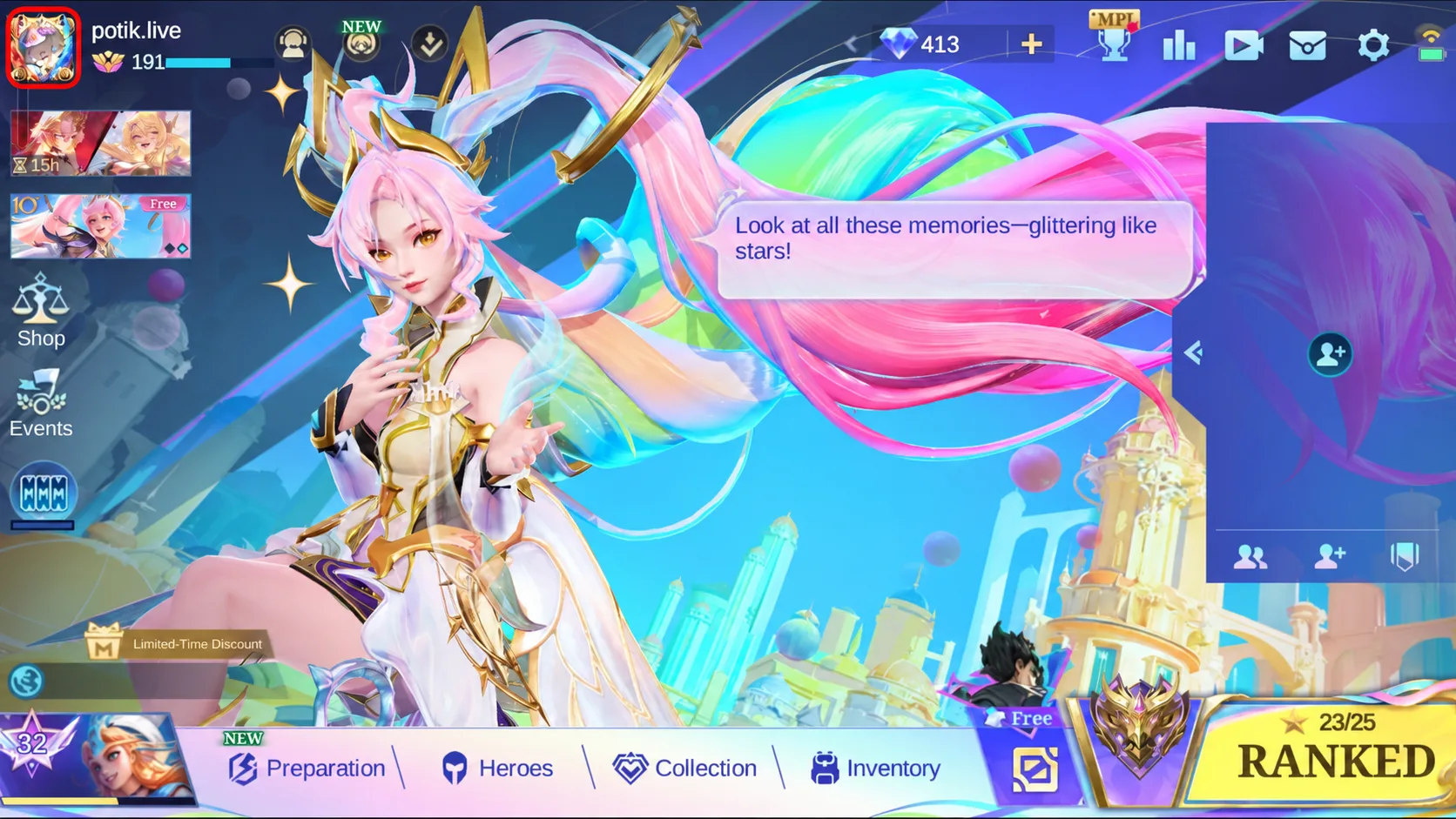
Tap your avatar in the upper-left corner.
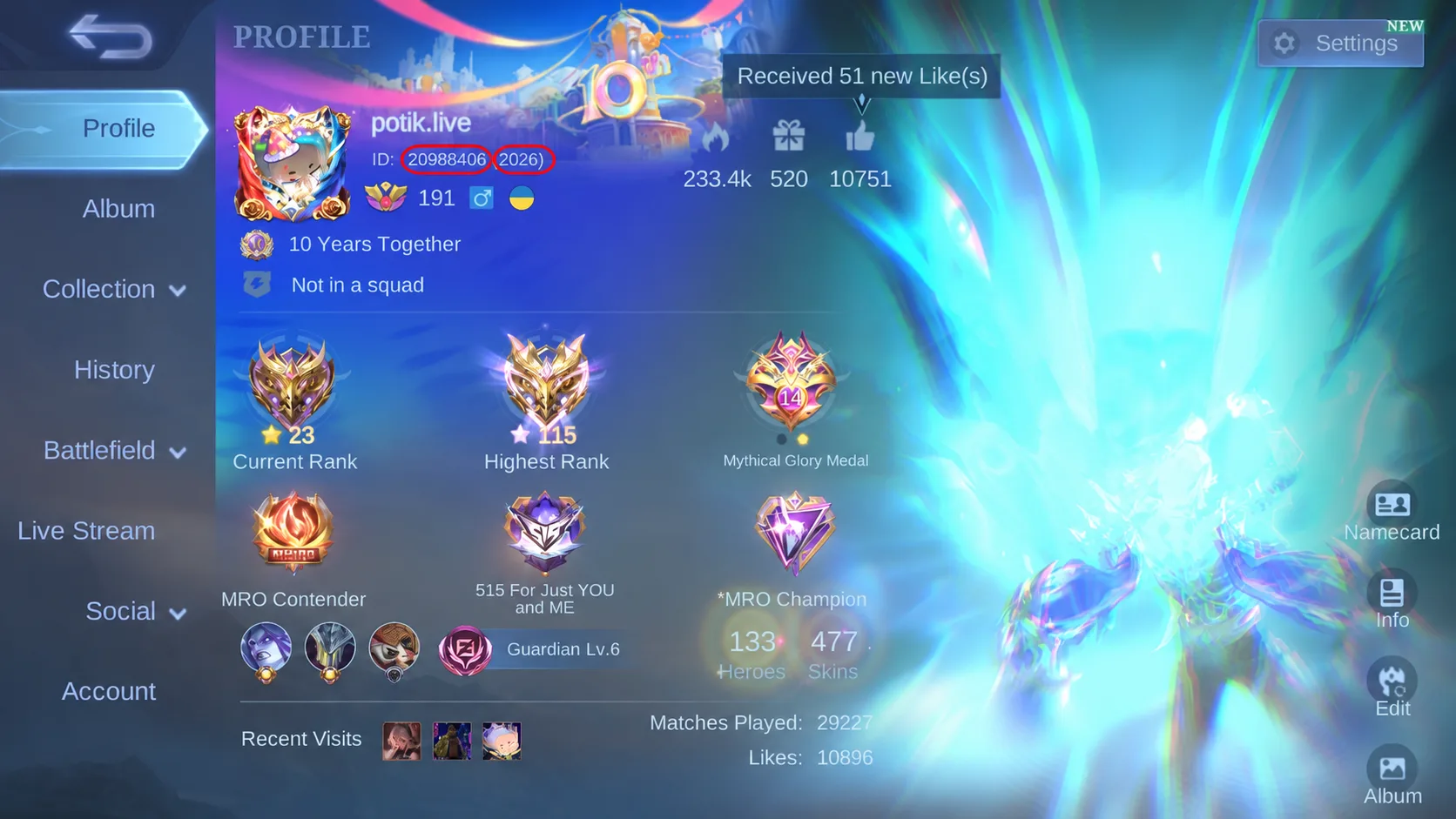
UID comes before the brackets; Server ID is inside them.
Open the pass card or the Diamond pack you need and fill in both fields. Check the nickname if the account lookup displays it. Choose a payment method and confirm the final total. Once delivery is complete, check your Diamond balance or pass activation in the game.


Discussion
0Sign in to leave a comment on this article.
Sign inIt is quiet here for now. Start the discussion.