

How to top up Ukrainian Steam with a bank card from abroad
This method requires KYC verification on Binance: an identity document and an identity check. Complete it before buying cryptocurrency.
On the Ukrainian Steam store, Baldur’s Gate 3 costs UAH 899, compared with €59.99 in Germany. The Ukrainian price is approximately 71% lower. If your account has the Ukrainian store region, you can pay for a top-up with a foreign bank card through Binance and Binance Pay on Potik.
Funds are credited to your Steam balance using your account login. Potik’s service fee for top-ups paid through Binance Pay is 0%.
On the Ukrainian Steam store, Baldur’s Gate 3 costs UAH 899, compared with €59.99 in Germany. The Ukrainian price is approximately 71% lower. If your account has the Ukrainian store region, you can pay for a top-up with a foreign bank card through Binance and Binance Pay on Potik.
Funds are credited to your Steam balance using your account login. Potik’s service fee for top-ups paid through Binance Pay is 0%.
How much you can save on games
| Game | Ukrainian price | Poland: price / savings | Germany: price / savings | UK: price / savings |
|---|---|---|---|---|
| Cyberpunk 2077 | UAH 1,399 | PLN 199 / 40% | €59.99 / 54% | £49.99 / 54% |
| Elden Ring | UAH 1,799 | PLN 249 / 38% | €59.99 / 41% | £49.99 / 41% |
| Baldur’s Gate 3 | UAH 899 | PLN 249 / 69% | €59.99 / 71% | £49.99 / 71% |
Standard-edition prices without discounts were checked on 7 November 2026. The percentages show how much lower the Ukrainian price is than the corresponding foreign price, converted using the National Bank of Ukraine exchange rates. They are rounded to the nearest whole percent. Binance and bank charges, if applicable, will reduce your actual savings. Other games may have different price gaps.
What this method is for
When you are in another country, Steam may offer to change your store country at checkout. If you select the new country and complete a purchase with a local bank card, Steam updates the region, and prices and currency follow the new store. This is how the change is described in the Steam rules.
With Binance Pay, you pay for a top-up of an account that already has the Ukrainian region. You use your foreign card to buy cryptocurrency on Binance, then enter your Steam login for the order on our website.
With Binance Pay, you pay for a top-up of an account that already has the Ukrainian region. You use your foreign card to buy cryptocurrency on Binance, then enter your Steam login for the order on our website.
Top up with a bank card in six steps
1. Register on Binance and complete KYC. Enter your actual country of residence. On the website, open Account → Identification → Get Verified, submit an identity document and complete the facial verification. Wait for approval. Binance instructions.
2. Find your Steam login. In Steam, open Account details. Check that the store country is Ukraine and copy your login. Your profile nickname or email cannot replace the login.
3. Check payment availability before buying cryptocurrency. In the top-up form, select the amount, enter your login and email, and choose Binance Pay. Open the payment request and check which asset is available for payment. Buy only an asset that your account allows you to use for this payment.
4. Buy the required cryptocurrency with your card. On Binance, open Buy Crypto, select your card currency and the required asset. Choose Card (Visa/Mastercard) → Add New Card or a saved card. Check the amount to be charged, the fee and the cryptocurrency amount. Confirm the purchase and check your balance. Buy with a card.
2. Find your Steam login. In Steam, open Account details. Check that the store country is Ukraine and copy your login. Your profile nickname or email cannot replace the login.
3. Check payment availability before buying cryptocurrency. In the top-up form, select the amount, enter your login and email, and choose Binance Pay. Open the payment request and check which asset is available for payment. Buy only an asset that your account allows you to use for this payment.
4. Buy the required cryptocurrency with your card. On Binance, open Buy Crypto, select your card currency and the required asset. Choose Card (Visa/Mastercard) → Add New Card or a saved card. Check the amount to be charged, the fee and the cryptocurrency amount. Confirm the purchase and check your balance. Buy with a card.
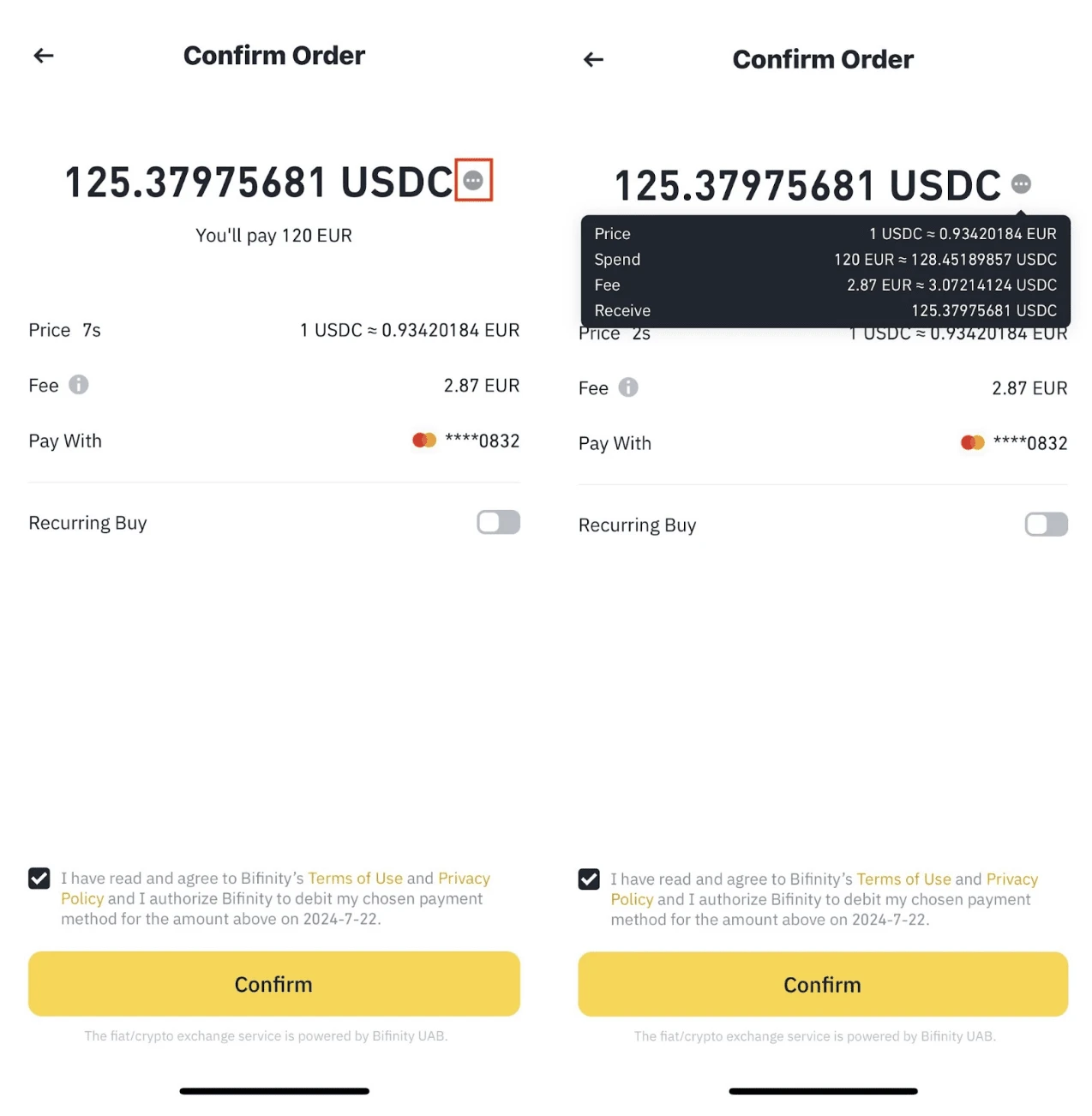
Checking the amount and fee before a card purchase in Binance Pro.
5. Pay for the top-up through Binance Pay. Return to your order, check the amount and recipient, then confirm the payment in Binance. If the payment request has expired, generate a new one.
5. Pay for the top-up through Binance Pay. Return to your order, check the amount and recipient, then confirm the payment in Binance. If the payment request has expired, generate a new one.
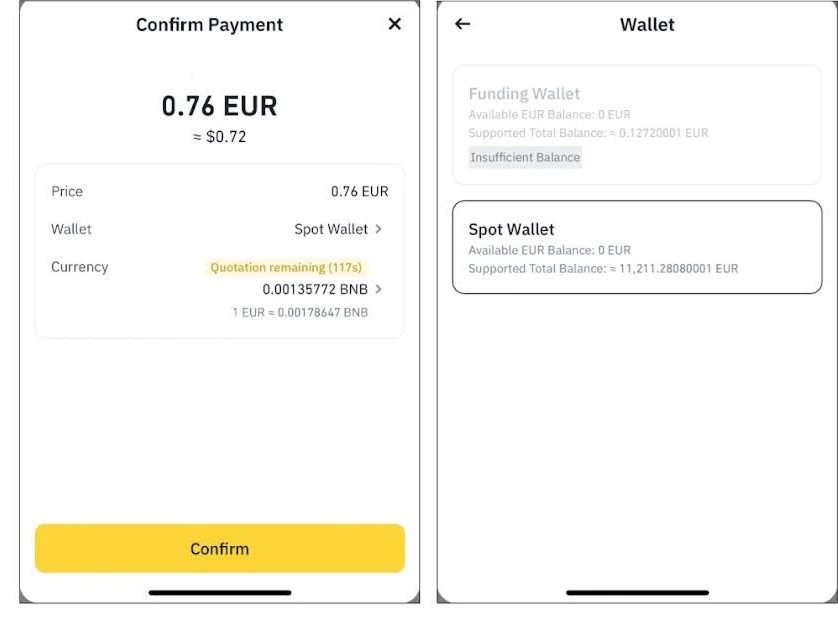
Confirming the payment amount and asset in Binance Pay.
6. Check the funds have arrived. Once the order is completed, open your Steam Wallet balance. You do not need to share your Steam password or Steam Guard codes for a top-up. If payment succeeded but the order is still processing, check its status before paying again.
6. Check the funds have arrived. Once the order is completed, open your Steam Wallet balance. You do not need to share your Steam password or Steam Guard codes for a top-up. If payment succeeded but the order is still processing, check its status before paying again.
Bank transfer instead of a card
If SWIFT is available in your Binance account, open Deposit → USD → Bank Transfer. Check the tariff and send a transfer from your own account using the Binance bank details, including the Reference Code. Once it arrives, buy the required cryptocurrency and pay for the order through Binance Pay. SWIFT instructions.
SWIFT availability depends on your account. Even if Binance charges no fee, your bank or an intermediary may charge one. For EUR, use a separately available SEPA channel; do not send a SWIFT transfer to SEPA bank details.
SWIFT availability depends on your account. Even if Binance charges no fee, your bank or an intermediary may charge one. For EUR, use a separately available SEPA channel; do not send a SWIFT transfer to SEPA bank details.
Fees and your Steam region
Even with Binance and bank fees, topping up remains cheaper as long as those costs do not exceed the game’s price difference. The smallest gap in the examples above is approximately 61% above the Ukrainian price. Before paying, check the total cost of buying cryptocurrency, transferring funds and currency conversion.
This method currently works for supported accounts and available payment methods. Our top-up itself does not change the store region. We do not guarantee that Steam will not change its rules or your account region in the future.
Top up Ukrainian Steam.
This method currently works for supported accounts and available payment methods. Our top-up itself does not change the store region. We do not guarantee that Steam will not change its rules or your account region in the future.
Top up Ukrainian Steam.

If you are unsure about the service, start with a small test top-up of USD 0.50.
Enter your Steam login — the account name you use to sign in to Steam. Your profile nickname, email address and Steam ID will not work.
Enter your Steam login — the account name you use to sign in to Steam. Your profile nickname, email address and Steam ID will not work.
Frequently asked questions
Who is this method for?
People who are abroad and already have a Steam account with Ukraine as the store country. You also need a verified Binance account and access to Binance Pay. This method does not move an account from another region to the Ukrainian store.
Can I use my foreign bank card?
Check whether your Binance account lets you buy the required cryptocurrency with your card. Before buying it, open your Steam top-up order and make sure Binance Pay allows you to pay for it with the selected asset.
Do I need to complete KYC on Binance?
Yes. The method described requires identity verification on Binance. Complete it and wait for approval before buying cryptocurrency. Submit the verification documents to Binance.
What Steam account details should I enter?
Your Steam login is the account name you use to sign in to Steam. Enter your email address separately for the order. Your profile nickname, email address and Steam ID cannot replace the login. You do not need to share your password or Steam Guard codes.
Are there any fees?
Potik’s service fee for Steam top-ups paid through Binance Pay is 0%. Binance, your bank or a payment intermediary may charge their own fees. Check the final amount before confirming payment.
Can I test the service with $0.50 first?
Yes. You can enter USD 0.50 in the Steam top-up form. This is the Steam top-up amount; check Binance’s card purchase limits for cryptocurrency separately.
Is keeping the Ukrainian Steam region guaranteed?
Our top-up itself does not change the store country. However, we cannot guarantee that Steam will not change its rules or your account region in the future.
Payment succeeded, but my Steam balance has not changed. What should I do?
Check the order status in My purchases. If the order is marked as completed but the funds have not arrived, contact support with your order number. Do not pay again until you have checked the status of the first payment.


Discussion
0Sign in to leave a comment on this article.
Sign inIt is quiet here for now. Start the discussion.